
" The right font can make all the difference "
In the world of web design, choosing the right font can make or break your website's user experience. Fonts do more than just convey information; they set the tone, build trust, and enhance readability. Whether you're designing a personal blog, an e-commerce platform, or a corporate site, selecting the best font is crucial. Here’s a comprehensive guide to help you navigate the vast sea of typography options and choose the best fonts for your website.
Why Font Choice Matters ?
1. First Impressions
Fonts play a critical role in creating a strong first impression. A well-chosen font can make your website appear professional, trustworthy, and engaging right from the start.
2. Readability
The primary purpose of text is to be read. If your font is hard to read, visitors will quickly leave your site. Good readability ensures that users can easily consume your content without strain.
3. Brand Identity
Fonts contribute to your brand's voice and personality. They should align with your brand’s values and message. For instance, a tech blog might use modern, sleek fonts, while a children's book website might use playful, whimsical fonts.
4. User Experience
A consistent and clean typography system enhances the overall user experience. It guides users through your content smoothly, ensuring they stay engaged.
Best Fonts for Websites
1. Sans-Serif Fonts
Sans-serif fonts are clean, modern, and highly readable on screens, making them a popular choice for websites.

a. Helvetica
- Pros: Clean, professional, versatile
- Cons: Overused in some contexts
- Use Case: Corporate sites, portfolios, blogs
b. Arial
- Pros: Highly readable, universally available
- Cons: Common, can appear generic
- Use Case: Business sites, e-commerce, educational sites
c. Roboto
- Pros: Modern, geometric, great for digital interfaces
- Cons: Can be perceived as too technical
- Use Case: Tech blogs, apps, startups
2. Serif Fonts
Serif fonts are characterized by their decorative strokes. They evoke tradition, reliability, and professionalism.

a. Times New Roman
- Pros: Classic, formal, widely recognized
- Cons: May feel outdated
- Use Case: News sites, academic publications, formal blogs
b. Georgia
- Pros: Elegant, highly readable on screens
- Cons: Slightly less modern
- Use Case: Literary blogs, academic sites, online magazines
c. Merriweather
- Pros: Contemporary, designed for readability
- Cons: Less traditional
- Use Case: Blogs, news sites, long-form articles
3. Display Fonts
Display fonts are decorative and best used for headings and short text. They grab attention and add personality to your site.

a. Playfair Display
- Pros: Stylish, elegant
- Cons: Not suitable for body text
- Use Case: Fashion blogs, creative portfolios, luxury brands
b. Oswald
- Pros: Bold, impactful
- Cons: Overpowering in large amounts
- Use Case: Headlines, banners, promotional content
c. Lobster
- Pros: Playful, distinctive
- Cons: Can be hard to read in long texts
- Use Case: Creative sites, event promotions, personal blogs
4. Monospace Fonts
Monospace fonts have uniform character spacing and are often used to display code or technical information.

a. Courier New
- Pros: Classic, clear
- Cons: Old-fashioned for non-technical use
- Use Case: Code snippets, tech blogs, developer portfolios
b. Consolas
- Pros: Modern, easy on the eyes
- Cons: Limited to technical content
- Use Case: Coding websites, programming tutorials, documentation
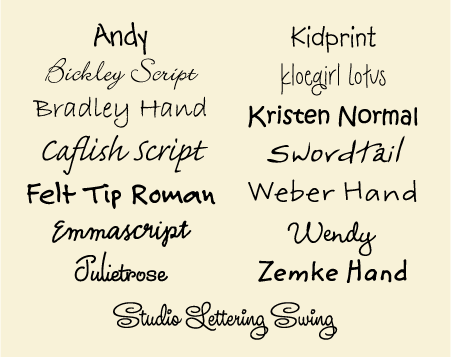
5. Handwritten Fonts
Handwritten fonts bring a personal and informal touch to your website.
a. Pacifico
- Pros: Fun, friendly
- Cons: Hard to read in large blocks
- Use Case: Personal blogs, lifestyle sites, creative projects
b. Dancing Script
- Pros: Elegant, inviting
- Cons: Limited readability in long texts
- Use Case: Invitations, creative portfolios, personal notes
Concluding all the fonts in a poem :
The words you write, a message clear,
But fonts amiss, can bring a tear.
A serif bold for headlines grand,
A sans-serif for text at hand.
Like clothing speaks, so fonts impart,
A playful script, a techie's art.
For trust and ease, a classic face,
For whimsy's touch, a looping grace.
So choose with care, this silent tongue,
The right one picked, your brand is sung.
For fonts well-matched, a visual rhyme,
Enhance your words, and stand the test of time.
Best Practices for Using Fonts
1. Limit Font Families
Stick to two or three font families to maintain a clean and cohesive design.
2. Pair Fonts Wisely
Pair fonts that complement each other. A common practice is to use a sans-serif font for body text and a serif or display font for headings.
3. Consider Readability
Ensure your font sizes, line heights, and letter spacing enhance readability.
4. Check Browser Compatibility
Use web-safe fonts or host web fonts to ensure consistent display across different browsers.
5. Responsive Design
Make sure your fonts look good on all devices, adjusting sizes and weights as necessary for readability on smaller screens.
Conclusion
Selecting the best fonts for your website is a blend of art and science. It requires understanding your brand, your audience, and the principles of good design. By choosing fonts that align with your site’s purpose and following best practices, you can create a visually appealing and highly functional website that keeps visitors engaged and coming back for more.
Experiment with different fonts, but always prioritize readability and user experience. Happy designing!
Comments
Post a Comment